
Instead of calling around after every alarm, connect your alarm notification process to an authorized board-up handoff: confirm damage, clear access, then request property securing. Alarm system board up dispatch needs a human approval gate—not an automatic board-up order for every sensor activation.
- Alarm system board up dispatch should connect verified damage, authorized approval, and a confirmed service request.
- Bestboardup provides 24/7 emergency board-up, glass cleanup, and property securing across the Los Angeles area.
- Keep alarm monitoring and emergency-service escalation separate from the contractor handoff.
- Test notifications, backup contacts, and contractor acknowledgment before relying on the workflow.
Why this matters
An alarm reports an event. It does not establish whether a window is broken, whether someone remains inside, or whether a contractor can safely enter. Your workflow must answer those questions before requesting work.
Bestboardup is best for Los Angeles residential and commercial customers needing emergency window and door board-up, glass cleanup, and property securing. Those services address the damaged opening; they do not replace alarm monitoring or emergency responders.
For your 2026 response plan, separate notification from authorization. A message sent to a property manager is not a service request accepted by a contractor, and an accepted request is not proof that the property is secured.
Before you start
- Get account access and permission. You need the alarm account administrator or monitoring provider, the property's authorized decision-maker, and permission to change notification instructions. Ask the alarm provider which contact-list changes and event notifications it supports.
- Prepare the property record. Record the service address, unit or suite, relevant alarm zones, primary and backup contacts, and access restrictions. Assign at least 2 authorized contacts so the workflow does not depend on one unavailable person.
- Confirm the handoff before configuring it. Ask the board-up provider how it accepts requests and who must approve work. Adding a contractor to an alarm contact list does not create an agreed dispatch arrangement. Keep alarm credentials and entry codes out of general notification messages.
Date the approved contact sheet in 2026 and name the person responsible for updating it. Use the instructions below as a response procedure, not as a claim that your alarm system has a particular integration, button, or setting.
Alarm notification rules
Start with your alarm provider's supported notification process. Do not build the response around an assumed connection between an alarm platform and a board-up contractor.
- Identify relevant events. Ask the account administrator which events can notify your response contacts. Match available event descriptions to the property's actual zones; a generic burglary notification needs clarification before anyone requests board-up.
- Route the notification to the decision-maker. Use the provider's supported contact settings or request a contact-list update through its established process. Make the primary contact responsible for verifying damage and arranging the contractor handoff.
- Assign the backup contact. Define who takes responsibility when the primary contact cannot respond. Agree on that escalation with your monitoring provider rather than inventing a timer that conflicts with its procedures.
- Keep emergency escalation intact. Do not replace the monitoring provider's emergency instructions with a contractor notification. If there is immediate danger, contact emergency services and stay away from the affected area.
- Confirm the saved instructions. Ask the administrator or monitoring provider to confirm the active contact details and event routing. Check the property address as well as the phone numbers or other supported contact methods.
Expected result: a relevant alarm notification reaches an authorized person who knows the property, understands the response procedure, and can contact a backup. No board-up request occurs solely because a sensor activated.
Damage verification and authorization
The approval gate keeps the workflow from confusing an alarm with confirmed damage. Verify remotely when possible; do not enter a potentially occupied, fire-damaged, or otherwise unsafe property to complete a checklist.
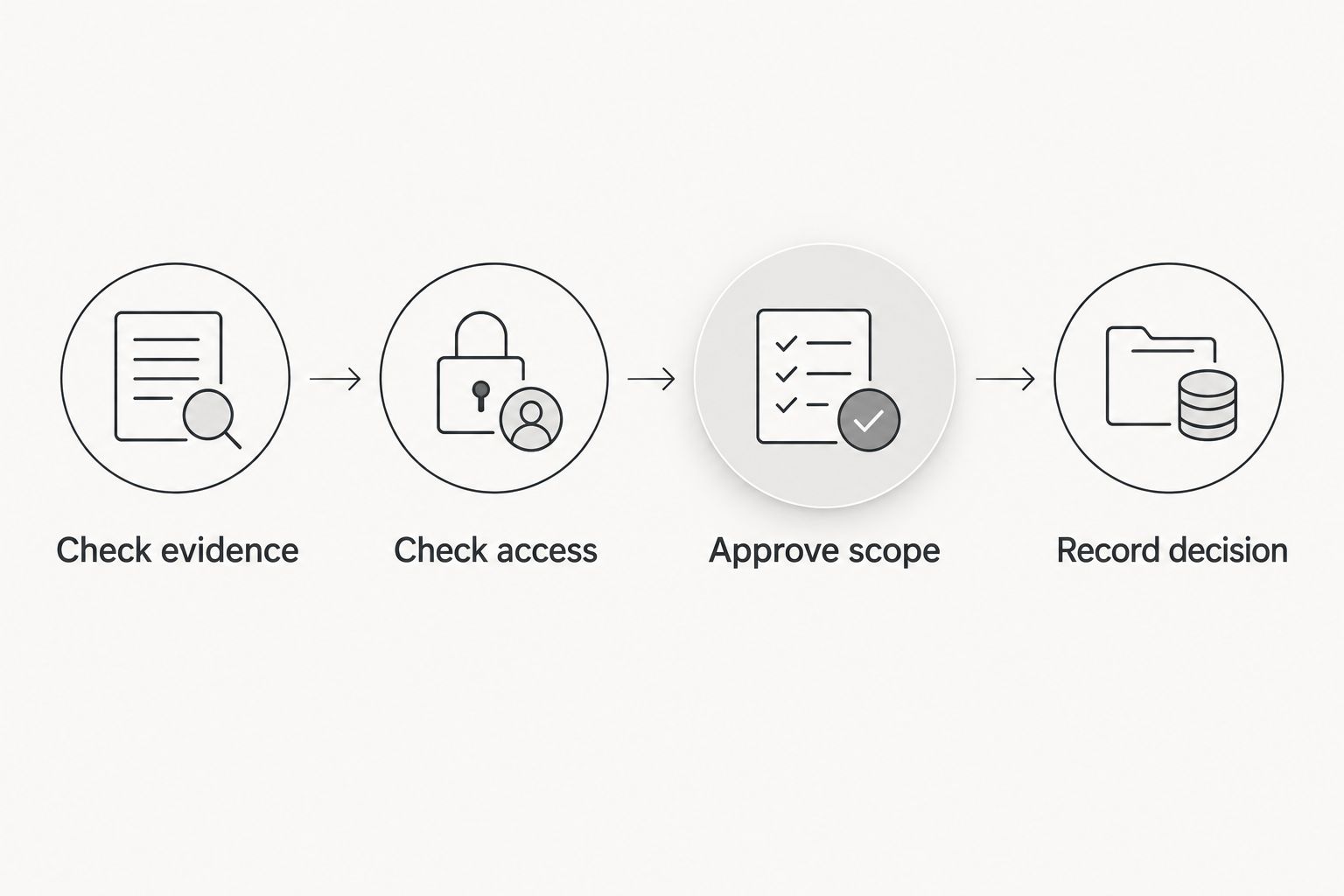
- Check the available evidence. Use permitted camera access, monitoring information, or observations from a person already in a safe location. Record what the evidence actually shows: broken glazing, a damaged door, or no visible damage.
- Resolve unknown conditions. If the notification does not identify the opening, contact the authorized site representative. Do not guess which door or window needs securing from a zone name alone.
- Check access restrictions. Ask whether emergency responders control the scene, whether entry is restricted, and whether the area is safe for contractor access. A photograph of damage is not clearance to enter.
- Approve the scope. The authorized decision-maker should specify the requested work: window board-up, door board-up, glass cleanup, or property securing. Separate this request from later repair decisions.
- Record the decision. Capture the approving person's name, the incident reference, the verification source, and any unresolved access issue. If damage is unconfirmed, record that outcome instead of issuing an unsupported request.
Expected result: you have a documented decision about the damaged opening, the requested service, and who has authority to approve it. Unresolved safety or access conditions remain visible rather than disappearing into a message thread.
Contractor handoff and completion record
A useful dispatch packet tells the contractor where to go, what is damaged, who can approve work, and what prevents access. It should not contain alarm passwords or unnecessary personal information.
- Create the incident record. Use a unique reference tied to the property. A record heading such as 2026 board-up incident can identify the current response file, but the reference must distinguish separate incidents at the same address.
- State the location precisely. Include the street address, unit or suite, and affected opening. Describe the opening's location in plain language, such as the storefront entrance or rear residential window, only when verified.
- Describe the requested work. State the known damage and requested service. Flag glass cleanup separately so the recipient understands that loose glass is part of the reported condition.
- Provide an authorized callback contact. Name the decision-maker and the person coordinating access. Share sensitive access instructions only through a method agreed with the recipient.
- Request explicit acknowledgment. Ask the provider to confirm receipt, whether it accepts the request, and any information still needed. Do not label the incident dispatched merely because an email or notification was delivered.
- Record completion separately. Obtain confirmation of the work performed and note anything still unresolved. Arrange permanent repairs through the appropriate process; temporary securing and permanent restoration are different tasks.
Expected result: the incident record distinguishes request sent, request accepted, access unresolved, and work completed. These are your internal tracking descriptions—not assumed field names in any alarm or contractor system.
For an actively damaged entrance, use the emergency door board-up services guide to keep the service discussion focused on securing the opening.
Arrange emergency property securing
Bestboardup provides 24/7 board-up, glass cleanup, and property securing across the Los Angeles area.
Workflow testing and ownership
Test the handoff without creating a real emergency request. Coordinate any alarm test with the monitoring provider first and follow its instructions; do not activate a live alarm simply to see who answers.
- Run 3 tabletop test cases. Walk through confirmed broken glass, an alarm with no confirmed damage, and an unavailable primary contact. These are practice scenarios, not performance benchmarks.
- Check the message contents. Have the receiving person identify the address, affected opening, approving contact, and access condition from the packet. Correct anything that requires guessing.
- Check the acknowledgment rule. Ask the team what happens when a request is sent but not accepted. The answer should identify who follows up through the provider's agreed contact method.
- Assign record ownership. Give one role responsibility for contact changes, access updates, and closing the incident. Keep a 2026 test record showing the scenario, the outcome, and the correction made.
Expected result: your team can explain who receives the alarm, who authorizes board-up, and who confirms completion. The backup path works on paper before a damaged property depends on it.
Update the request when incident details change
An adjacent workflow handles new information after the initial handoff. Use it when another damaged opening is discovered, access conditions change, or the authorized site contact changes.
Update the existing incident record instead of creating an unrelated request. Identify what changed, retain the original reference, and ask the recipient to acknowledge the revision. If the provider has not accepted the initial request, make that status clear.
| Workflow | Best for | Advantage | Limitation |
|---|---|---|---|
| New-incident handoff | Newly verified damage needing an initial board-up request | Establishes authorization, location, and scope together | Requires verification before the request proceeds |
| Existing-incident update | Changed damage, access, or contact details | Keeps revised instructions attached to the same incident | Requires acknowledgment so outdated instructions are not followed |
Use the new-incident handoff for a new event and the existing-incident update for revised instructions. Neither workflow replaces the provider's own request process. Agree on how revisions are received before relying on them during an emergency.
Troubleshooting
The alarm reaches someone who cannot approve work
Change the response contact assignment through the alarm provider's supported process. Keep the informed tenant, employee, or neighbor separate from the person authorized to request property securing.
The fix is an authorization path, not a larger notification group. Broad distribution creates more messages without establishing who owns the decision.
The zone description does not identify the damaged opening
Compare the alarm zone information with the property's current layout and ask the account administrator to resolve outdated descriptions. Keep a plain-language location note in the incident record.
Do not send a contractor to a guessed opening. A zone activation and a verified broken window are different pieces of information.
The request was sent, but nobody confirmed acceptance
Follow up through the provider's agreed contact method and record the result. Keep the incident marked as unaccepted until a recipient confirms otherwise.
A notification delivery receipt proves message delivery, not contractor acceptance. Escalate through the property's response contacts rather than repeatedly sending identical requests.
Duplicate alerts create duplicate requests
Use the incident reference to group notifications from the same reported event. Assign one decision-maker to manage the contractor handoff and tell other contacts who owns it.
Before opening another request, check whether new damage belongs to the existing incident. Add a revision when appropriate rather than creating competing instructions.
A contractor cannot access the property
Confirm the access contact, entry restrictions, and any responder-controlled area before arranging entry. Send changed access instructions through the agreed channel and request acknowledgment.
Do not distribute an alarm code to everyone copied on the incident. Keep sensitive access information limited to people who need it.
Customize your workflow
Expand the response by property, not by adding more alerts. For each location, identify who approves work, who coordinates access, and who holds the completion record. A residential contact arrangement does not automatically fit a staffed commercial site.
Bestboardup's board-up and property securing services belong at the contractor handoff stage. The strength of that arrangement is a defined service request for a damaged opening; its limit is that it does not itself verify an alarm event or establish permission to enter.
For your 2026 procedure, add separate instructions for occupied buildings, vacant properties, and locations with restricted access. Keep emergency exits and responder access requirements visible in the request. Ask the responsible building representative about restrictions rather than treating every opening alike.
FAQ
How do I connect my alarm system to board-up dispatch?
Connect supported alarm notifications to an authorized response contact, then use a verified-damage approval step before requesting board-up. Confirm the contractor’s request and acknowledgment process separately from the alarm setup.
Can every alarm automatically trigger a board-up request?
Do not use every alarm activation as authorization for board-up. Verify physical damage, confirm safe access, and obtain approval from the property’s authorized decision-maker first.
Does Bestboardup have a direct alarm-system integration?
Confirm any direct integration with Bestboardup and your alarm provider before configuring it. Bestboardup provides 24/7 emergency window and door board-up, glass cleanup, and property securing across the Los Angeles area.
What information should I send with a board-up request?
Send the exact address, affected opening, verified damage, requested work, authorized callback contact, and access restrictions. Keep alarm credentials out of general notifications.
What should happen if the primary property contact does not answer?
Route responsibility to the designated authorized backup through your agreed response procedure. Confirm that escalation with the alarm provider before relying on it.
Does an alarm notification mean a contractor has been dispatched?
No, an alarm notification does not establish that a contractor accepted a service request. Record acceptance separately and follow up through the provider’s agreed contact method.
Should I reset the alarm after the property is boarded up?
Follow the alarm provider’s instructions after the opening is secured. Temporary boarding does not establish that the affected sensor or alarm zone operates normally.
One last thing
Securing the opening does not finish the alarm workflow. After the work, ask the alarm provider how the affected sensor or zone should be checked and have the authorized account holder follow those instructions.
Add that follow-up to your 2026 completion record. Close the board-up task and the alarm follow-up separately so a secured window does not hide an unresolved monitoring issue.
